
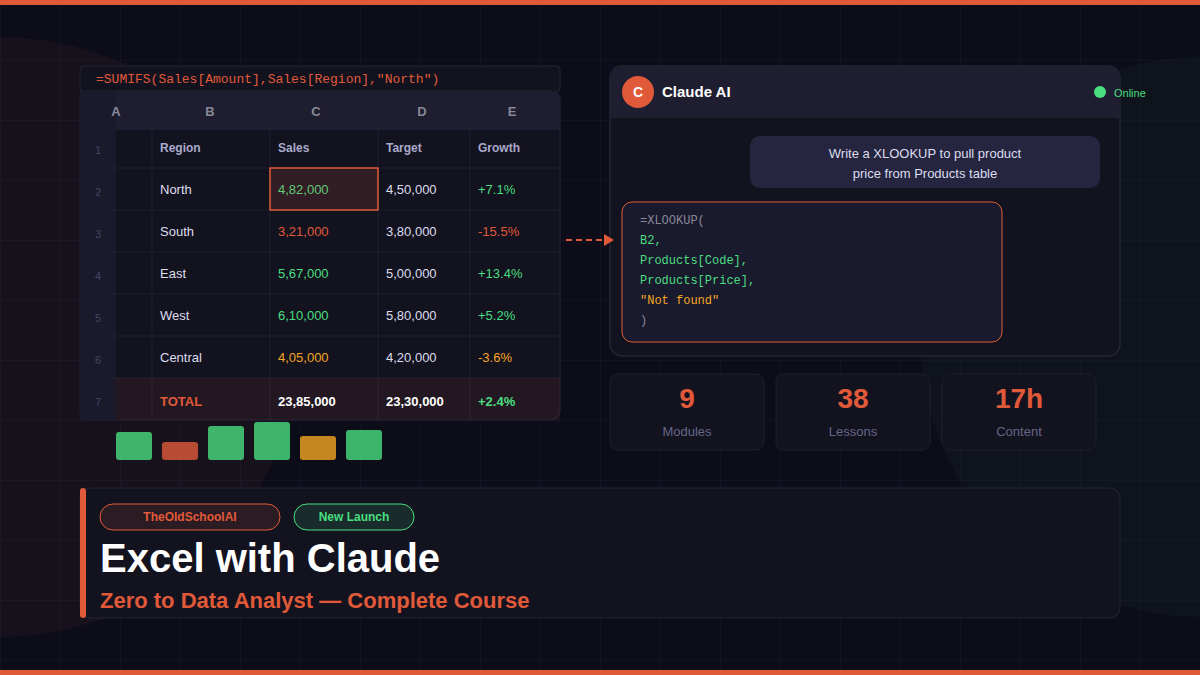
Excel with Claude: Zero to Data Analyst is India’s most practical Excel course built for MIS executives, data analysts, finance professionals and anyone who works with Excel every day.
What makes this course different from every other Excel course? Every single lesson is built around Claude AI. You do not memorise formulas — you learn to describe what you need in plain English and Claude writes the formula for you. Then you understand it, apply it, and master it. This is how modern Excel professionals work in 2026.
What You Will Learn
Module 1 — Excel Foundations
Start from absolute zero. Learn how cells, rows, columns and ranges work. Understand data types and why storing a date as text breaks every formula that touches it. Master Excel Tables — the single most underused feature that makes every formula, PivotTable and Power Query task dramatically easier.
Module 2 — Core Formulas and Functions
Learn SUM, AVERAGE, COUNT, IF, VLOOKUP, XLOOKUP, and text and date functions. Every formula is explained by Claude in plain English before you apply it in Excel. Learn to write IF logic by describing your business rule and letting Claude convert it to a formula instantly.
Module 3 — Advanced Formulas
Go beyond the basics with INDEX MATCH, dynamic array functions like FILTER, UNIQUE and SORT, INDIRECT for dynamic sheet references, and LAMBDA for building your own reusable custom functions. These are the formulas that separate basic Excel users from professional analysts.
Module 4 — Data Cleaning and Transformation
80 percent of real analyst work is cleaning data. Learn to audit messy datasets systematically, find and remove duplicates, split and combine columns, and set up data validation rules that prevent bad data at the source. Claude helps you generate all cleaning formulas in seconds.
Module 5 — PivotTables and Advanced Charts
Build PivotTables that summarise thousands of rows in seconds. Add slicers and timelines for interactive filtering. Learn calculated fields, running totals and percentage breakdowns. Design professional dashboards with the right chart type for every data story.
Module 6 — Power Query
Automate your entire data import and cleaning workflow. Connect to CSV files, Excel workbooks, folders and web sources. Merge and append multiple data sources. Set up parameterised queries that refresh automatically every week without any manual work.
Module 7 — Statistical Functions for Analysts
Go beyond counting and summing. Learn descriptive statistics, percentiles, correlation and forecasting. Build What-If analysis models using Goal Seek, Scenario Manager and Data Tables for sensitivity analysis.
Module 8 — Power Pivot and Data Modelling
Build a mini database inside Excel. Load multiple related tables into a data model, define relationships, and write DAX measures for Total Revenue, YTD comparisons, year-on-year growth and rolling averages. This is what separates basic Excel users from real analysts.
Module 9 — Real World Analyst Projects
Apply everything in end-to-end projects. Build a complete MIS reporting workbook. Execute a full data analysis from raw CSV to executive summary. Master advanced Claude prompting for Excel. Complete a capstone project that uses every skill from the course.
Who Is This Course For
This course is built for Indian MIS executives who build monthly reports manually and want to automate them. It is for data analysts who want to go from formulas to full data models. It is for finance and CA professionals who work with Excel every day. It is for anyone who has tried to learn Excel before and given up because it felt too technical.
No coding required. All tools are free. Claude AI is your co-pilot throughout every lesson.
By the end of this course you will have built real analyst deliverables — dashboards, Power Query workflows, DAX measures and complete MIS reports — that you can use immediately in your job.
This is not a theory course. Every lecture has a practical exercise, exact Claude prompts to type, and a step-by-step walkthrough of what to do in Excel. You learn by doing, not by watching.
Join hundreds of Indian professionals who are already using AI to work smarter in Excel.


Reviews
There are no reviews yet.